Datasheet: Live Single Cell Functional Analysis with Beacon Discoveryâ„¢
Access Resource

Optofluidic Software

Cell Analysis Suite Software

Design and execute functional single cell experiments in real-time with unparalleled flexibility and ease.

Design Smarter. Analyze Faster. Discover More.

The Cell Analysis Suite (CAS®) is powerful software designed for the Beacon optofluidic platform, enabling researchers to customize and automate functional single-cell workflows. Tailor your data insights to specific research needs, whether for antibody discovery, cell line development, T cell profiling, or adoptive cell therapy.

The Cell Analysis Suite empowers you to:

  • Design: Develop your experiments with maximum flexibility using pre-validated templates, following guided workflows, or creating fully customized workflows
  • Execute: Save time with fully automated workflows, while retaining the ability to make adjustments and monitor
real-time results
  • Analyze: Delve deeper into multi-modal functional single cell data to discover novel interactions and cells
Just Released: The Cell Analysis Suite 4.0 (CAS 4.0)!
CELL ANALYSIS SUITE SOFTWARE: WORKFLOW DESIGN

Flexible Workflow Design Options: Create the Ideal Experiment
for Your Research Questions

The CAS software simplifies designing workflows on the Beacon platform without compromising on detail or precision.

Templated Workflows

Leverage pre-defined, pre-validated templated workflows for antibody discovery, T cell profiling, and cell line development​ to save time and ensure consistency and accuracy.

Guided Workflows

For Beacon Discovery, utilize the new, easy-to-use wizard-based interface, Experiment Wizard, to help guide you in designing your workflows​ in just a few clicks. 

Custom Workflows

Utilize Workflow Builder, a user-friendly drag-and-drop interface, to customize workflow operations and refine parameters, allowing for full customization to meet any specific protocol, input, or output requirements.

Dive Deeper into the Data with Powerful Software

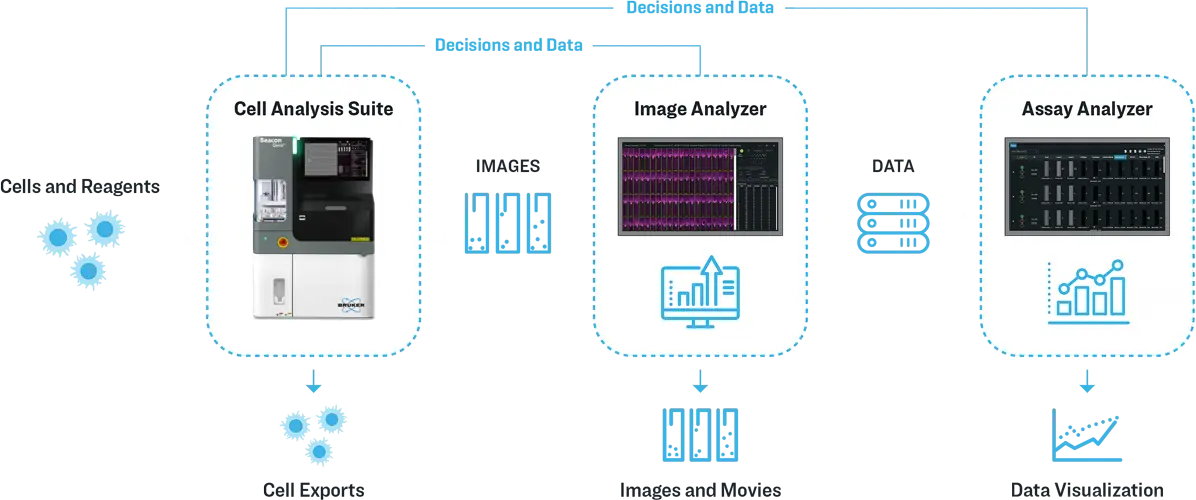
The CAS software runs all assay operations, from workflow design to data visualization to exporting live cells of interest.
img-cas-workflow-01b-3-bruker-opt
Image Analyzer

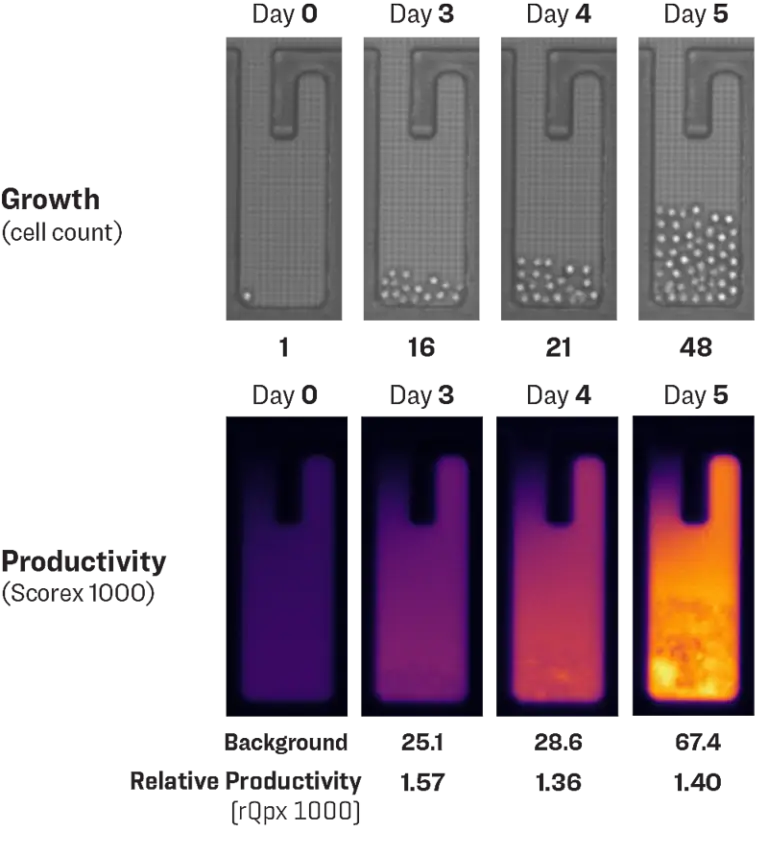
Image Analyzer (IA) lets you extract and analyze data from individual images generated by the Beacon platform.

  • Adjust fluorescence and brightfield levels
  • Verify and reanalyze cell counts
  • Apply gating tools
  • Inspect images across fields of view, time points, and channels
  • Process time-lapse sequences
  • Create publication-ready figures
img-image-analyzer-01a-768x855-opt
Assay Analyzer

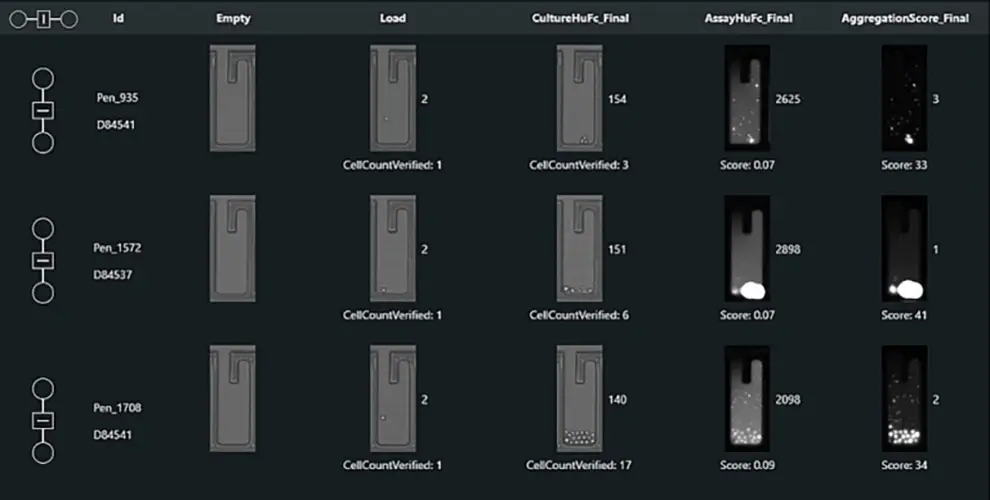
The Assay Analyzer (AA) lets you analyze data from multiple image sources generated by the Beacon platform.

  • Use customizable templates, advanced filters, and graphing tools
  • Select and visualize specific cells or pens
  • Track clone histories and export cells of interest
  • Generate PDF reports with compiled images and data
  • Streamline decision-making
img-assay-analyzer-01a-768x388-opt
Cell Analysis Suite Software: IMAGE ANALYSIS

Deep Data Insights: Harness Real-Time Analysis
for Informed Decision-Making

The CAS software offers both automated and manual image analysis tools,
enabling users to explore and interpret data as it is generated in real-time.

 
Machine Learning Algorithm

Machine learning algorithms can be used for various automated image processing tasks, including cell counting, cell segmentation, and assay bloom detection.

Fluorescent Sorting

Target and Pen Selection enables single cells to be detected, measures morphology and fluorescence, and allows decision making in an automated fashion, including loading or unloading cells into NanoPen® chambers.

Interactive Data Verification

Cell count and assay bloom results can be manually verified and adjusted to ensure the highest data accuracy.

Why upgrade to the NEW CAS 4.0 on your Beacon optofluidic system?

Experiment Wizard for Beacon Discovery

The new wizard provides a step-by-step guided interface that streamlines experimental design, reducing setup time and error potential.

Automated T Cell Tracking for Beacon and Beacon Discovery

Track T cells interacting with antigen presenting cells over time, linking dynamic cellular phenotypes to function.

Integrated UMAP Visualization for Beacon and Beacon Discovery

Visualize complex multi-parameter datasets with ease using the new UMAP feature. This tool distills high-dimensional functional single-cell data into clear, interactive 2D maps, making it easier to identify functional subpopulations and rare phenotypes.

Advanced Features for Specialized Applications

CAS 4.0 introduces powerful upgrades to support evolving research needs, including streamlined data import into Assay Analyzer, a new general detector for identifying any cell type, and population dynamics tools for Cell Line Development. These enhancements prepare your system for specialized, high-impact workflows. Whether you're focused on antibody discovery, cell therapy development, or immune profiling, CAS 4.0 enables a more efficient and data-driven workflow, from experimental setup through final analysis.

Cell Analysis Suite Software

Unleash the Full Potential of Your Single Cell Research

Maximize the power of your Beacon optofluidic platform with the latest release of the Cell Analysis Suite software, CAS 4.0.

Want to upgrade or learn more about CAS 4.0? Complete the form to connect with us and explore how CAS 4.0 can elevate your research.